
Extract text from invoices
AI-powered OCR with instant recognition.
Upload file
Drag & drop your file here, paste (⌘V / Ctrl+V), or click to upload
Up to 10MB — sign in for larger files
99.2%
Recognition accuracy
50+
File formats
110+
Languages
5s
Avg processing
From invoices to chemical formulas
Invoices, payslips, formulas, handwriting — anything scans.
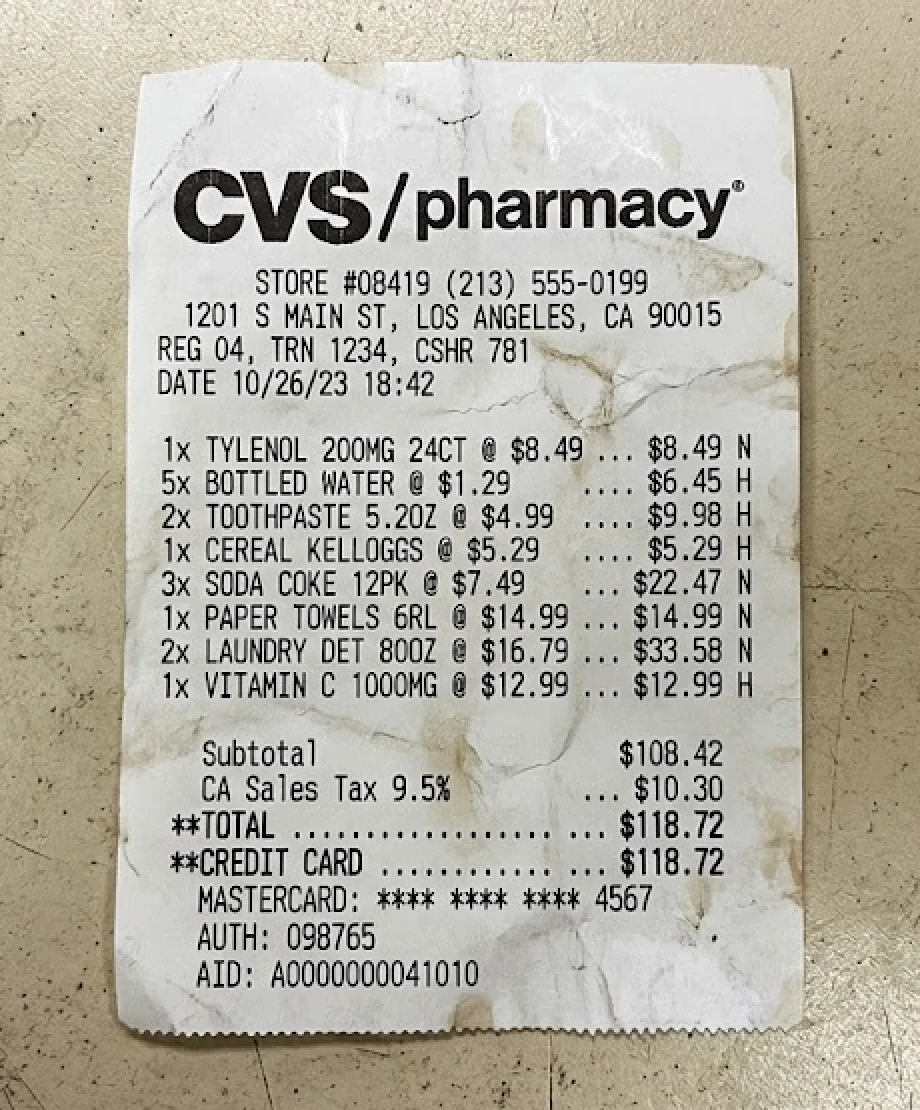
CVS/pharmacy®
STORE #08419 (213) 555-0199
1201 S MAIN ST, LOS ANGELES, CA 90015
REG 04, TRN 1234, CSHR 781
DATE 10/26/23 18:42
| 1x TYLENOL 200MG 24CT @ $8.49 ... $8.49 N |
|---|
| 5x BOTTLED WATER @ $1.29 ... $6.45 H |
| 2x TOOTHPASTE 5.20Z @ $4.99 ... $3.98 H |
| 1x CEREAL KELLOGGS @ $5.29 ... $5.29 H |
| 3x SODA COKE 12PK @ $7.49 ... $22.47 N |
| 1x PAPER TOWELS GRL @ $14.99 ... $14.99 N |
| 2x LAUNDRY DET 800Z @ $16.79 ... $33.58 N |
| 1x VITAMIN C 1000MG @ $12.99 ... $12.99 H |
| Subtotal $108.42CA Sales Tax 9.5% ... $10.30TOTAL $118.72CREDIT CARD $118.72MASTERCARD: ** ** 4567AUTH: 098765AID: A0000000041010 |
Built for every document type
From invoices and tax forms to resumes and handwritten notes — our AI is fine-tuned on formats across 180+ countries and dozens of languages.
CrazyOCR vs Traditional OCR
AI-powered vision-language models outperform rule-based engines in every benchmark.
Benchmarks: FUNSD, SROIE, ICDAR 2019, DocVQA. March 2026.
| Benchmark | CrazyOCR | Tesseract | Google Vision |
|---|---|---|---|
| Printed Text | 99.2% | 85.4% | 97.8% |
| Handwriting | 91.7% | 42.3% | 78.9% |
| Table Recognition | 96.8% | 31.2% | 89.4% |
| Multi-column Layout | 95.3% | 28.6% | 82.1% |
| CJK (JP/CN/KR) | 97.1% | 62.8% | 91.3% |
| Low-quality Scan | 91.2% | 51.7% | 79.3% |
| Document w/ Watermark | 94.8% | 38.9% | 72.4% |
Export to any format
From plain text to structured data. One click.
TXT
Plain text
Markdown
Rich formatting
LaTeX
Formulas as LaTeX equations
CSV
Spreadsheet ready
JSON
Structured data
Excel
Microsoft Excel
Word
Microsoft Word
Trusted by professionals
Finance, legal, tech, accounting — they all use CrazyOCR.

Sarah Lin
Accountant, Northwind Bookkeeping
“Finally an OCR tool that handles bank statements perfectly. The column alignment is flawless — it saved me hours every week.”

Marco Rivera
Operations Manager, Lumen Logistics
“We process a few hundred invoices a month. CrazyOCR cut our processing time by 70%, and the JSON export plugs straight into our ERP.”

Hiroko Sato
Office Manager, Tanaka Design Studio
“Japanese vertical receipts always came through garbled with other tools. CrazyOCR is the first one that gets the layout right.”

Priya Nair
Paralegal, Corbett & Partners
“The privacy-first approach sold us. Client documents stay under our control, and the OCR quality on scanned contracts is genuinely impressive.”

Ben Kowalski
Founder, Paperwork.dev
“Clean API, great docs, fast responses. We integrated it into our onboarding flow in one afternoon and it's been rock-solid since.”

Lucía Fernández
Finance Director, Aguilar Imports
“Spanish invoices come through perfectly. Receipt photo to expense report in seconds — I wish I'd switched to CrazyOCR a year ago.”
Sarah Lin
Accountant, Northwind Bookkeeping
“Finally an OCR tool that handles bank statements perfectly. The column alignment is flawless — it saved me hours every week.”
Marco Rivera
Operations Manager, Lumen Logistics
“We process a few hundred invoices a month. CrazyOCR cut our processing time by 70%, and the JSON export plugs straight into our ERP.”
Hiroko Sato
Office Manager, Tanaka Design Studio
“Japanese vertical receipts always came through garbled with other tools. CrazyOCR is the first one that gets the layout right.”
Priya Nair
Paralegal, Corbett & Partners
“The privacy-first approach sold us. Client documents stay under our control, and the OCR quality on scanned contracts is genuinely impressive.”
Ben Kowalski
Founder, Paperwork.dev
“Clean API, great docs, fast responses. We integrated it into our onboarding flow in one afternoon and it's been rock-solid since.”
Lucía Fernández
Finance Director, Aguilar Imports
“Spanish invoices come through perfectly. Receipt photo to expense report in seconds — I wish I'd switched to CrazyOCR a year ago.”
Lucía Fernández
Finance Director, Aguilar Imports
“Spanish invoices come through perfectly. Receipt photo to expense report in seconds — I wish I'd switched to CrazyOCR a year ago.”
Ben Kowalski
Founder, Paperwork.dev
“Clean API, great docs, fast responses. We integrated it into our onboarding flow in one afternoon and it's been rock-solid since.”
Priya Nair
Paralegal, Corbett & Partners
“The privacy-first approach sold us. Client documents stay under our control, and the OCR quality on scanned contracts is genuinely impressive.”
Hiroko Sato
Office Manager, Tanaka Design Studio
“Japanese vertical receipts always came through garbled with other tools. CrazyOCR is the first one that gets the layout right.”
Marco Rivera
Operations Manager, Lumen Logistics
“We process a few hundred invoices a month. CrazyOCR cut our processing time by 70%, and the JSON export plugs straight into our ERP.”
Sarah Lin
Accountant, Northwind Bookkeeping
“Finally an OCR tool that handles bank statements perfectly. The column alignment is flawless — it saved me hours every week.”
Lucía Fernández
Finance Director, Aguilar Imports
“Spanish invoices come through perfectly. Receipt photo to expense report in seconds — I wish I'd switched to CrazyOCR a year ago.”
Ben Kowalski
Founder, Paperwork.dev
“Clean API, great docs, fast responses. We integrated it into our onboarding flow in one afternoon and it's been rock-solid since.”
Priya Nair
Paralegal, Corbett & Partners
“The privacy-first approach sold us. Client documents stay under our control, and the OCR quality on scanned contracts is genuinely impressive.”
Hiroko Sato
Office Manager, Tanaka Design Studio
“Japanese vertical receipts always came through garbled with other tools. CrazyOCR is the first one that gets the layout right.”
Marco Rivera
Operations Manager, Lumen Logistics
“We process a few hundred invoices a month. CrazyOCR cut our processing time by 70%, and the JSON export plugs straight into our ERP.”
Sarah Lin
Accountant, Northwind Bookkeeping
“Finally an OCR tool that handles bank statements perfectly. The column alignment is flawless — it saved me hours every week.”
Simple, transparent pricing
Start free. Upgrade when you need more. Each OCR request processes one file (image or document).
FREE
billed annually
- 10 OCR requests / month
- 1 file per request, up to 5 pages
- Max 10 MB per file
- TXT & Markdown export
- Encrypted OCR
- History kept for 1 day
Get started free
For getting started
BASIC
BASIC ≈ 2 coffee ☕
billed annually
- 1,000 OCR requests / month
- 1 file per request, up to 200 pages
- Max 200 MB per file
- All export formats · No watermark
- Encrypted OCR
- History kept for 90 days
- API access · Token auth
Start Basic
Full API capacity — for professionals
PREMIUM
billed annually
- 5,000 OCR requests / month
- 1 file per request, up to 200 pages
- Max 200 MB per file
- All exports · Priority queue
- Encrypted OCR
- History kept for 90 days
- API + Webhooks
Start Premium
Same quality, more volume — for teams
Frequently asked questions
Everything you need to know about CrazyOCR.
General
What is CrazyOCR?
CrazyOCR is a universal document AI that extracts text from images, PDFs, invoices, passports, and more. Upload a file and get editable, searchable text in seconds.
Do I need an account to use it?
Nope. You can upload and OCR one document without creating an account. Sign up to unlock more files, exports, and history.
Is my data secure?
Yes. Uploaded files are encrypted in transit and stored temporarily. We never use your documents for training or any purpose beyond delivering your OCR result.
Features & Accuracy
How accurate is the OCR?
We achieve 99.2% accuracy on printed text. Handwriting and low-quality scans have lower accuracy, but our AI continuously improves.
What export formats are supported?
TXT, Markdown, JSON, and CSV are available on the free tier. Excel and Word export are coming soon for paid plans.
Can it handle tables and forms?
Absolutely. Our engine detects table structures, form fields, and multi-column layouts. Bank statements and invoices are a specialty.
How many languages can it recognize?
Over 110 languages: English, French, German, Spanish, Italian, Portuguese, Dutch, Polish, Swedish, Norwegian, Danish, Finnish, Turkish, Russian, Ukrainian, Arabic, Persian, Hindi, Chinese, Japanese, Korean, Thai, Greek, Tamil, Telugu, Kannada and many more. It auto-detects the document language, with a language pack selector for best results on non-Latin scripts.
Pricing & Limits
How much does it cost?
The Free plan gives you 10 OCR requests per month (each request processes one image or document). Basic is $12/month ($9/month billed annually) for 1,000 requests. Premium is $29/month ($22/month billed annually) for 5,000 requests with priority processing.
What counts as one OCR request?
Each uploaded file = one request. A single image or a 200-page PDF both count as one request. There is no separate image vs document counter.
Is there a file size limit?
Free plan supports files up to 10MB. Basic and Premium support up to 200MB per file and documents up to 200 pages.
Can I cancel anytime?
Yes. There are no long-term contracts. Cancel anytime and your plan stays active until the end of the billing period.
Ready to extract some text?
Upload a file and see it in action. No sign-up required.
Upload file
Drag & drop your file here, paste (⌘V / Ctrl+V), or click to upload
Up to 10MB — sign in for larger files